
Generative AI & LLM Configuration
Viglet Turing integrates Generative AI throughout the platform via Spring AI, providing a unified abstraction layer over multiple LLM providers and embedding backends. The GenAI capabilities are organized around four connected concepts: LLM Instances, Tool Calling, MCP Servers, and AI Agents, which together define how the system reasons, retrieves, and responds.
RAG (Retrieval-Augmented Generation) is the primary pattern used to ground LLM responses in real content: both the Knowledge Base (files stored in MinIO) and Semantic Navigation Sites can serve as RAG sources.
Global Settings
Section titled “Global Settings”Before configuring individual LLM Instances, AI Agents, or RAG sources, establish platform-wide defaults in Administration → Settings. These defaults apply wherever no specific override is configured.
| Setting | Description |
|---|---|
| Default LLM Instance | The LLM provider used when no specific instance is selected in an AI Agent or SN Site |
| Default Embedding Store | Which vector database backend to use (ChromaDB, PgVector, or Milvus) |
| Default Embedding Model | The embedding model used to generate vector representations during indexing and at query time |
| RAG Enabled by Default | Whether RAG is pre-enabled for new Semantic Navigation Sites |
| Python Path | Absolute path to the Python executable used by the Code Interpreter tool |
| Email Settings | SMTP configuration for system notifications |
LLM Instances
Section titled “LLM Instances”An LLM Instance is a named, configured connection to an LLM provider. Multiple instances can coexist: different AI Agents, SN Sites, and the Chat interface can each use a different instance independently.
Turing ships 11 vendor types: OLLAMA, OPENAI, ANTHROPIC, GEMINI, GEMINI_OPENAI, OPENAI_COMPAT (any OpenAI-compatible endpoint), BEDROCK, VOYAGE, COHERE, MISTRAL, and VERTEX_AI.
| Vendor | Default Model | Embedding | Tool Calling |
|---|---|---|---|
| OLLAMA | mistral |
✅ | ✅ |
| OPENAI | gpt-4o-mini |
✅ | ✅ |
| ANTHROPIC | claude-sonnet-4-20250514 |
❌ | ✅ |
| GEMINI | gemini-2.0-flash |
✅ | ✅ |
| GEMINI_OPENAI | gemini-2.0-flash |
❌ | ✅ |
| OPENAI_COMPAT | (per endpoint) | ✅ | ✅ |
| BEDROCK | anthropic.claude-3-5-sonnet-... |
✅ | ✅ |
| VOYAGE | voyage-3 |
✅ | ❌ (no chat) |
| COHERE | command-r-plus |
✅ | ✅ |
| MISTRAL | mistral-large-latest |
✅ | ✅ |
| VERTEX_AI | gemini-2.0-flash |
✅ | ✅ |
Azure OpenAI was removed (Spring AI dropped the module). Reach an Azure-hosted deployment via the OpenAI-Compatible vendor.
For the full UI reference (form sections, per-vendor authentication, provider options, capability matrix, and API key security) see LLM Instances.
Embedding Stores & Models
Section titled “Embedding Stores & Models”Turing delegates vector storage to one of three backends (ChromaDB, PgVector, Milvus) and uses an embedding model to generate and query vectors. The choice of backend and model affects both storage cost and similarity quality.
See Embedding Stores for backend comparison and Embedding Models for provider support, model selection guidance, and configuration details.
RAG Architecture
Section titled “RAG Architecture”Retrieval-Augmented Generation (RAG) grounds LLM responses in indexed content. Rather than relying on training data alone, Turing retrieves the most semantically relevant documents and injects them into the prompt before generation.
Turing supports two RAG sources:
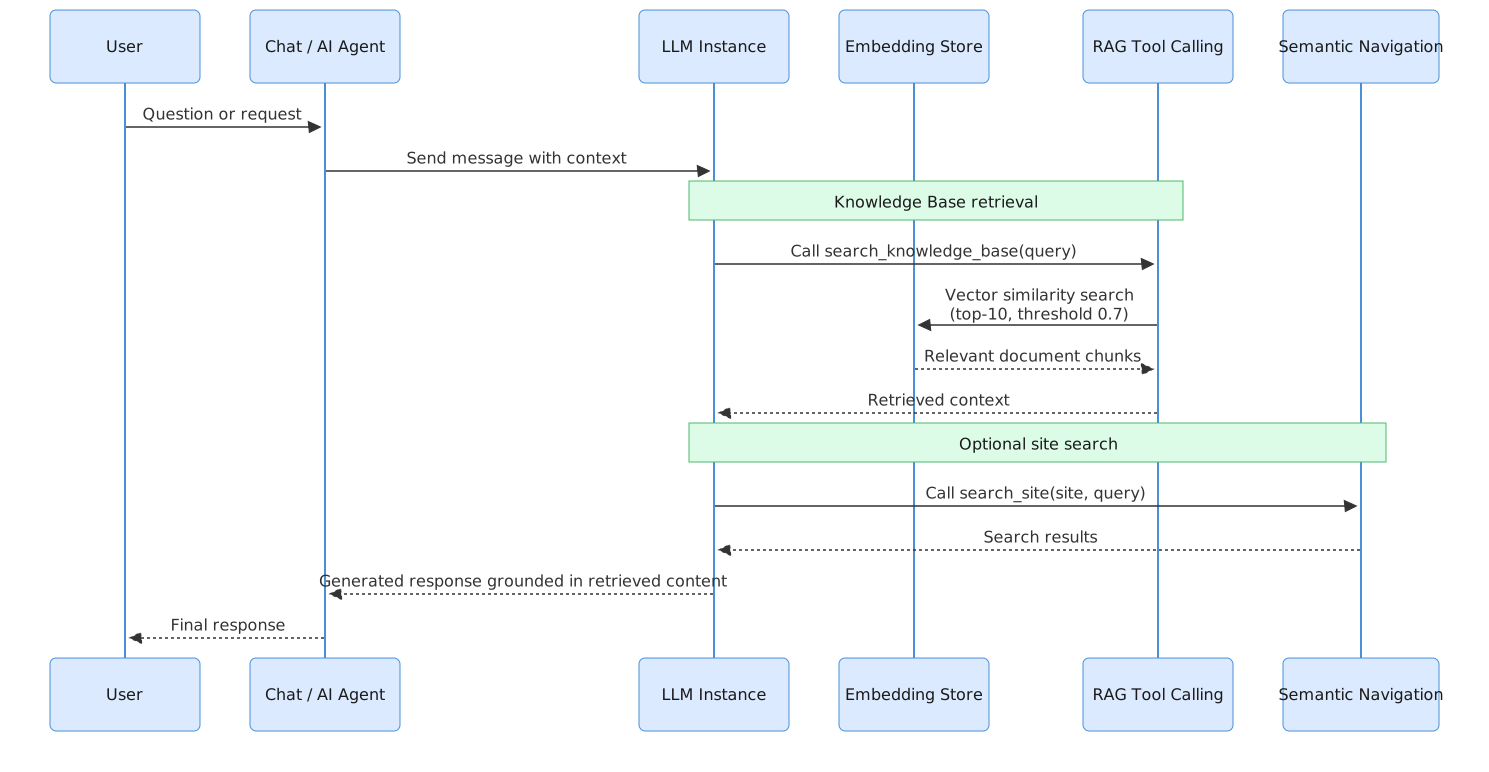
By default, Turing retrieves the top 10 most similar chunks with a similarity threshold of 0.7. Documents below the threshold are excluded from the context.
Knowledge Base (Assets)
Section titled “Knowledge Base (Assets)”The Knowledge Base is built from files managed in the Assets section, a file manager backed by MinIO. Files are extracted with Apache Tika, truncated to 100,000 characters, split into 1,024-character chunks, embedded, and stored in the active embedding store.
Full documentation is available on the Assets page.
RAG for Semantic Navigation Sites
Section titled “RAG for Semantic Navigation Sites”When GenAI is enabled for an SN Site, indexed documents are also embedded and stored in the vector store alongside their Solr representation. This allows AI Agents and the SN Site chat to retrieve relevant content via semantic similarity. Configure this in the site’s Generative AI section: see Semantic Navigation → Generative AI.
Tool Calling
Section titled “Tool Calling”Turing includes 27 native tools across 7 categories that AI Agents can invoke autonomously: Semantic Navigation (15), RAG / Knowledge Base (4), Web Crawler (2), Finance (2), Weather (1), Image Search (1), DateTime (1), and Code Interpreter (1).
See Tool Calling for the full tool reference.
Gemini native primitives (F.16)
Section titled “Gemini native primitives (F.16)”Turing has two ways to reach Google Gemini, and the difference matters:
| Vendor | Path | What you get |
|---|---|---|
gemini (native GenAI SDK) |
A dedicated native chat branch over com.google.genai.Client |
The full set of Google-native primitives below |
gemini-openai (OpenAI-compatible) |
The generic OpenAI seam | Plain chat + function calling only |
The native gemini branch engages only when the instance’s capability matrix is non-empty: an empty matrix keeps the classic Spring AI path, so every existing Gemini agent is byte-for-byte unchanged. Each primitive is opt-in through the two-level capability gate.
Server-side built-in tools
Section titled “Server-side built-in tools”These run in Google’s infrastructure, not via a Turing crawler or sandbox. Each is a capability you select per agent (see the Capabilities TOOL matrix):
| Primitive | What it does |
|---|---|
| Google Search grounding | The model runs Google Search server-side and returns grounding metadata (per-segment support + source spans) that decodes onto the same citation contract as Anthropic/Cohere; Google’s terms require rendering the returned Search Suggestion chips (streamed as a searchSuggestions event) |
| URL Context | The model pulls a URL/PDF named in the prompt directly in Google’s infra, no crawler. Coexists with Search grounding in one turn |
| Code execution | A built-in Python sandbox; generated code, output, and inline matplotlib images come back as response parts rendered into the answer (images as inline data: URIs) |
| Native image generation | Sets responseModalities to include IMAGE on an image-capable model (gemini-2.5-flash-image / Imagen), the generated image returns as an inline data part |
| Computer Use | gemini-2.5-computer-use-* via the same vendor-neutral driver seam as the OpenAI/Anthropic variants (ships against a no-op driver; owns the whole turn) |
Reasoning, batch, files & embeddings
Section titled “Reasoning, batch, files & embeddings”| Primitive | What it does |
|---|---|
| Thinking budget + thought summaries | A thinkingConfig caps reasoning tokens (0 disables, -1 dynamic) and can surface a thought summary on the shared reasoning SSE event, it lands in the “Why this answer” panel with no UI change |
| Batch (chat + embeddings) | A Gemini Batch provider runs nightly summarization, LLM-Judge eval, and in-place re-embedding at the Batch ~50% discount instead of synchronous full price |
| Files bridge | Binaries mirror into the Gemini Files API and are referenced by URI for native PDF/video grounding (Gemini files are retained ~48 h, so the content-addressed cache row expires and re-uploads after that) |
| Embeddings + asymmetric task types | gemini-embedding-001 with RETRIEVAL_DOCUMENT at index time / RETRIEVAL_QUERY at query time, see Embedding Models |
Innovation bets
Section titled “Innovation bets”| Primitive | What it does |
|---|---|
| Explicit context caching | Cache the stable prefix (system prompt + pinned grounding) as a named, TTL’d Gemini cachedContents object and reuse it across turns/users at a steep discount, the RAG cost lever (a gemini-context-cache Request Option; off by default) |
| Full-context (retrieval-free) answering | For a small site whose whole corpus fits Gemini’s 1–2 M-token window, skip top-K retrieval and ground over every chunk (100% recall by construction). Opt-in per site with a token budget; fail-open back to top-K when the corpus is too large. Pairs with context caching so the corpus is billed once |
| Native video / audio understanding | Hand a clip to Gemini natively (frames + audio) for a timestamped transcript + scene description, both at chat time (a VIDEO multimodal slot) and at index time (transcript appended to the document’s text field so spoken/visual content becomes searchable). Opt-in per site, fail-open |
MCP Servers
Section titled “MCP Servers”AI Agents can connect to any external server implementing the Model Context Protocol (MCP) to access tools beyond the 27 native ones: company-internal systems, proprietary APIs, or public MCP services. Configured in Administration → MCP Servers.
See MCP Servers for transport types, configuration form, and examples.
AI Agents
Section titled “AI Agents”An AI Agent combines a specific LLM Instance, a set of tools, and MCP Servers into a single deployable assistant. Each agent appears as a separate tab in the Chat interface and can be purpose-built for specific roles: enterprise search, data research, IT operations, and more.
See AI Agents for configuration, composition examples, and the agent execution flow.
Related Pages
Section titled “Related Pages”| Page | Description |
|---|---|
| LLM Instances | Configure the 11 vendor connections |
| Capabilities | Native server tools + the two-level gate |
| What is RAG? | The retrieval pipeline in depth |
| Embedding Models · Embedding Stores | The vector pipeline |
| Reranking | Sharpen retrieved context before generation |
| AI Agents | Compose an agent from an LLM + tools + persona |